
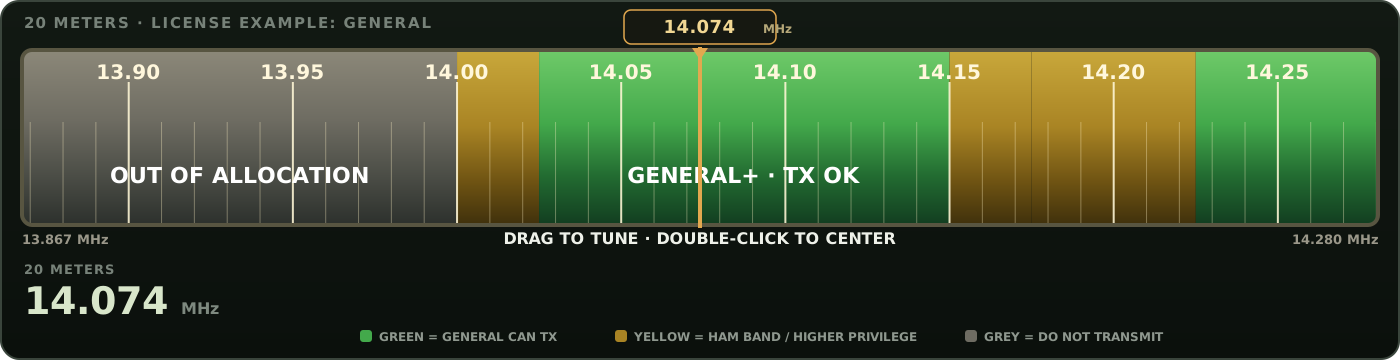
BANDTRACK + BAND PLAN
See what’s around your frequency.
Drag the scale, jump straight to amateur bands or nearby reference services, and keep license-class privileges and band-plan context visible while you tune.
Logging, callsign lookup, BandTrack, mapping, and field reference tools in one radio-focused deck. Your local log and preferences stay with this device so the essentials remain close at hand.
QSO Deck has moved well beyond the original mockup. Logging, BandTrack, the Band Plan, callsign lookup, Radio Map, weather, and satellite tools are now part of the working deck.
Drag the scale, jump straight to amateur bands or nearby reference services, and keep license-class privileges and band-plan context visible while you tune.
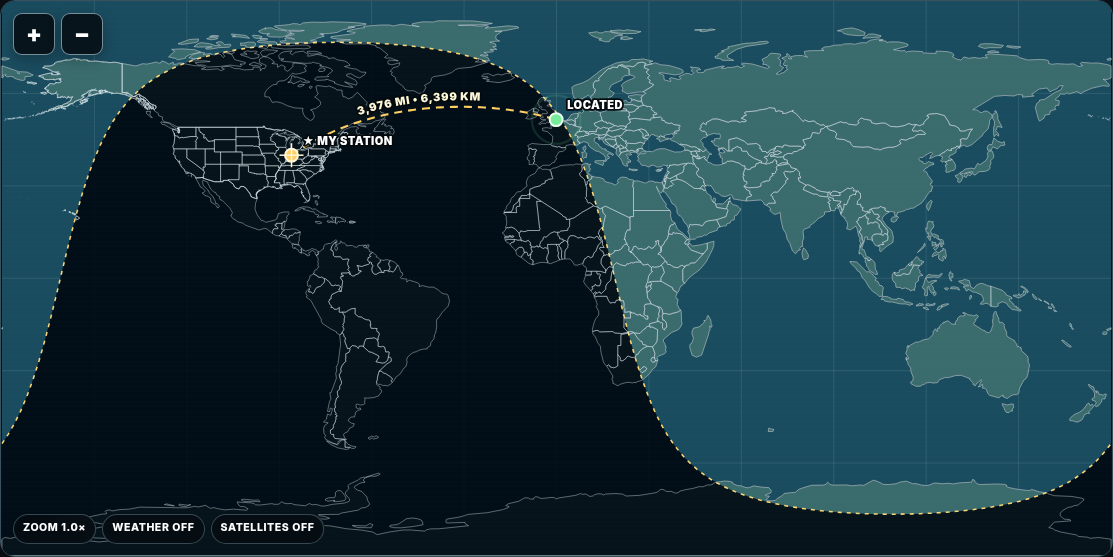
Locate stations, see distance and bearing, draw the route between stations, overlay weather and daylight, and inspect satellite passes from your own station.
Log, view, edit, and delete contacts locally with the core information an operator actually needs.
Import and export ADIF so contacts can move between QSO Deck and the rest of your logging workflow.
Look up FCC-backed callsign information, keep useful records locally, and send a located station straight to Radio Map.
The core deck is operational and being refined in small passes. The remaining work is mostly polish, packaging, and deeper radio integration—not proving the concept anymore.
Active development build
QSO Deck is a developing amateur-radio companion focused on straightforward logging, useful at-a-glance information, and dependable offline operation. The goal is a tool that feels at home on a shack computer, a field laptop, or inside a portable go-box.
Put QSO Deck on this device like an app. The core interface is cached for offline use; live services such as current weather, FCC lookup, account actions, and fresh satellite data still need a connection.
Sign in to your QSO Deck account.
Manage your radio identity and account status.
Server-authorized staff tools for member safety and site administration.
Checking your verification status…
Member safety controls are separate from administrator powers. Moderators can act on standard user accounts only.
Suspend Login immediately invalidates that member’s existing sessions and blocks new logins until restored. “Mute operator” is a future-ready flag for comments/chat; it does not block logging, BandTrack, Lookup, or Radio Map today.
Private account management, staff roles, sign-in activity, and audit history. Every admin request is re-authorized by the Worker.
Anonymous means the visitor was not signed in at the time. A registered operator visiting while signed out will also count as anonymous. No raw IP address or precise GPS coordinate is stored. Primary-admin traffic is excluded from these product-usage totals.
Every registration is forced to USER both in Worker code and by a D1 insert trigger. Only an administrator can promote an existing account. The primary administrator cannot be demoted or moderated.
Location is approximate. QSO Deck does not store precise GPS coordinates or raw IP addresses in these staff analytics tables.
High-visibility sliding radio dial for amateur privileges plus AIRBAND, TRAIN / RAILROAD, MARITIME, NOAA Weather, broadcast, CB, MURS, and FRS/GMRS reference context. The needle stays fixed while the scale moves underneath it.
FRS uses 22 shared channels. GMRS has 30 FCC channels: 8 main 462 MHz, 8 main 467 MHz, and 14 interstitial channels. Common radio labels 15R–22R below refer to the eight 467 MHz GMRS repeater-input frequencies.
Large-format U.S. amateur-band quick reference. Choose a license class below, or ALL to see the complete amateur reference without treating Extra as a stand-in for every band.
Privilege bubbles: FULL = that class covers the complete amateur allocation shown on the card; PARTIAL = only part of the band; NONE = no transmit privilege. Select a class for exact segment details.
60 meters uses four narrow channels plus a 15-kHz segment under special rules effective February 13, 2026. 2200 m and 630 m require Utilities Technology Council notification before operation. Some UHF/microwave allocations also carry geographic or sharing restrictions.
OTHER RADIO SERVICES — receive/reference context. These stay tan/grey because an amateur license does not authorize transmission in them.
REFERENCE| Service | Frequency / Channels | Context |
|---|
Fast Amateur and GMRS license lookup.
Make QSO Deck fit the operator and the device. These preferences are saved locally on this device, so a shack computer, field laptop, and go-box can each have their own look.
Search radio words and acronyms used throughout QSO Deck. Definitions explain the term first, then show how it is used in BandTrack, the Band Plan, Radio Map, and normal operating.
Type what you forgot. No need to scroll through a dictionary.
QSO Deck is an offline-first amateur-radio companion built around field logging, callsign context, mapping, and radio-useful data. External data remains credited to the organizations and projects that make those features possible.
RainViewer's public API is used for QSO Deck's personal / non-commercial global-radar feature with visible source credit. Its public radar timeline currently supplies about two hours of past radar. NOAA/NWS MRMS supplies a four-hour moving radar window. If QSO Deck is ever released for commercial use, its third-party weather terms should be reviewed before that release.
QSO Deck uses first-party aggregate traffic analytics so the private administrator dashboard can show visitor counts, page views, broad country information, and which QSO Deck areas are being opened. The browser creates a random identifier that the API hashes before storage. QSO Deck does not use an ad tracker for this feature and does not store raw IP addresses or precise GPS coordinates in the analytics tables. Primary-admin traffic is excluded from the traffic totals.
Your station, callsign distance and bearing, live daylight, NOAA radar, and satellite positions.
LIVE ORBIT
Log contacts locally, then import or export standard ADIF without needing the QSO Deck server to hold your radio log.
Import existing .ADI files or export this local QSO Deck log. Duplicate imports are skipped when the core QSO fields match.
| UTC | Call | Band / Freq | Mode | Sent / Rcvd | Grid | Source | Actions |
|---|
QSO Deck stores this log locally in your browser using IndexedDB. Export an ADIF backup before clearing browser/site data.
Saved QSO